
Basic Usage
bun install react
bun install react@19.1.1 # specific version
bun install react@latest # specific tag
The bun CLI contains a Node.js-compatible package manager designed to be a dramatically faster replacement for npm, yarn, and pnpm. It's a standalone tool that works in existing Node.js projects; if your project has a package.json, you can use bun install.
⚡️ 25x faster — Switch from npm install to bun install in any Node.js project to make your installations up to 25x faster.
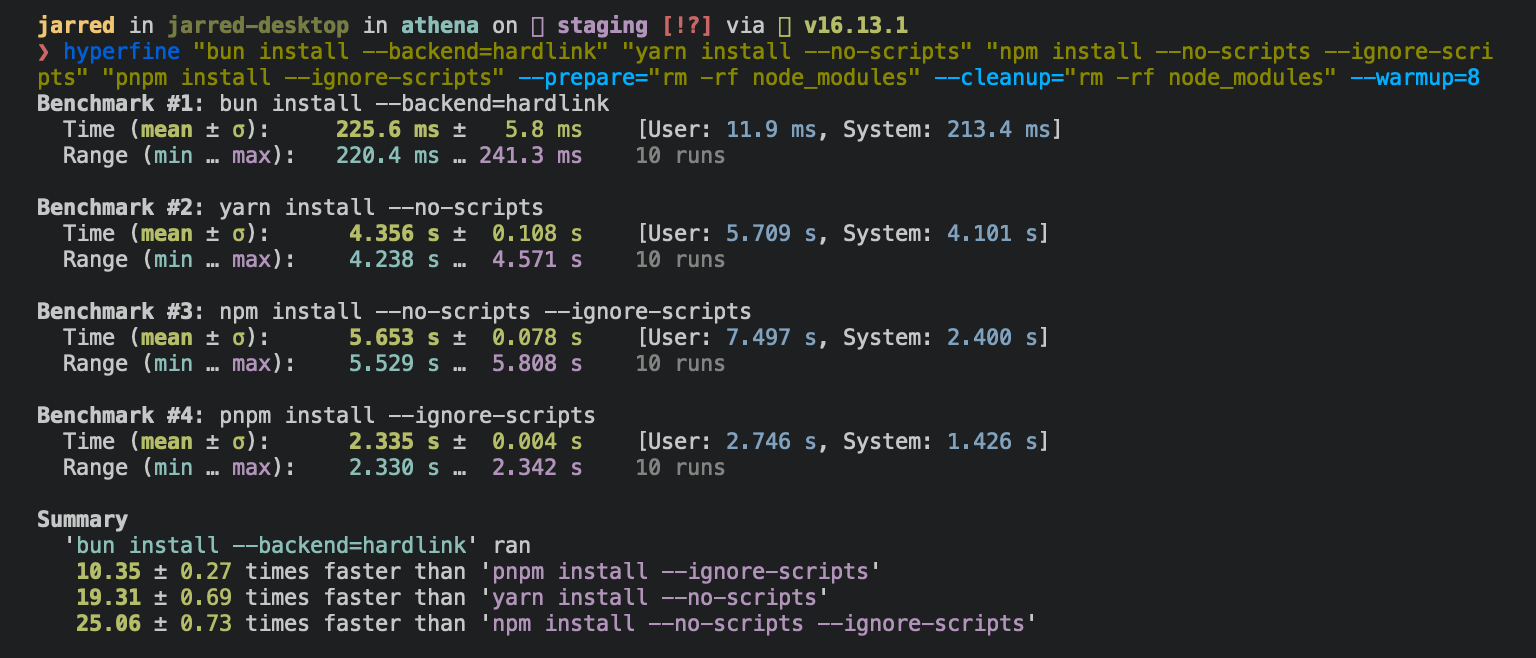
To install all dependencies of a project:
bun install
bun install:
- Installs all
dependencies,devDependencies, andoptionalDependencies. Bun installspeerDependenciesby default. - Runs your project's
{pre|post}installand{pre|post}preparescripts at the appropriate time. For security reasons Bun does not execute lifecycle scripts of installed dependencies unless they are trusted. - Writes a
bun.locklockfile to the project root.
Logging
To modify logging verbosity:
bun install --verbose # debug logging
bun install --silent  # no logging
Lifecycle scripts
Unlike other npm clients, Bun does not execute arbitrary lifecycle scripts like postinstall for installed dependencies. Executing arbitrary scripts represents a potential security risk.
To tell Bun to allow lifecycle scripts for a particular package, add the package to trustedDependencies in your package.json.
{
  "name": "my-app",
  "version": "1.0.0",
  "trustedDependencies": ["my-trusted-package"] // [!code ++]
}
Then re-install the package. Bun reads this field and runs lifecycle scripts for my-trusted-package.
Lifecycle scripts run in parallel during installation. To adjust the maximum number of concurrent scripts, use the --concurrent-scripts flag. The default is two times the reported cpu count or GOMAXPROCS.
bun install --concurrent-scripts 5
Bun automatically optimizes postinstall scripts for popular packages (like esbuild and sharp) by determining which scripts need to run. To disable these optimizations:
BUN_FEATURE_FLAG_DISABLE_NATIVE_DEPENDENCY_LINKER=1 bun install
BUN_FEATURE_FLAG_DISABLE_IGNORE_SCRIPTS=1 bun install
Workspaces
Bun supports "workspaces" in package.json. See workspaces.
{
  "name": "my-app",
  "version": "1.0.0",
  "workspaces": ["packages/*"], // [!code ++]
  "dependencies": {
    "preact": "^10.5.13"
  }
}
Installing dependencies for specific packages
In a monorepo, you can install the dependencies for a subset of packages using the --filter flag.
# Install dependencies for all workspaces except `pkg-c`
bun install --filter '!pkg-c'

# Install dependencies for only `pkg-a` in `./packages/pkg-a`
bun install --filter './packages/pkg-a'
See filtering.
Overrides and resolutions
Bun supports npm's "overrides" and Yarn's "resolutions" in package.json. Both specify a version range for metadependencies, the dependencies of your dependencies. See overrides and resolutions.
{
  "name": "my-app",
  "dependencies": {
    "foo": "^2.0.0"
  },
  "overrides": { // [!code ++]
    "bar": "~4.4.0" // [!code ++]
  } // [!code ++]
}
To add a dependency or peer dependency that a third-party package forgot to declare, use pnpm's and Yarn's "packageExtensions". See package extensions.
Global packages
To install a package globally, use the -g/--global flag. Use it to install command-line tools.
bun install --global cowsay # or `bun install -g cowsay`
cowsay "Bun!"
 ______
< Bun! >
 ------
        \   ^__^
         \  (oo)\_______
            (__)\       )\/\
                ||----w |
                ||     ||
Production mode
To install in production mode (without devDependencies):
bun install --production
--production implies --frozen-lockfile. It only controls what gets installed. devDependencies already in node_modules from an earlier install stay there. Use bun prune --production to remove them.
For reproducible installs, use --frozen-lockfile. Bun installs the exact versions specified in the lockfile and does not update it. If your package.json disagrees with bun.lock, Bun exits with an error.
bun install --frozen-lockfile
package.json disagrees with bun.lock when a dependency would resolve to a different package, and also when a dependency of the root or of a workspace was added, removed, moved to another group or given another range (^1.0.0 to >=1.0.0) while every package stays as locked. The same goes for overrides and catalog. Run bun install and commit the updated bun.lock to fix it. Other edits, such as a workspace's version, bin or scripts, trustedDependencies and patchedDependencies, do not fail the install. If the package.json of a file: directory changed its dependencies, Bun prints a warning and installs what is locked.
Bun does not enable --frozen-lockfile automatically in CI; pass the flag or use bun ci. If there is no lockfile at all, --frozen-lockfile installs from package.json without writing one.
If the project has a package-lock.json, yarn.lock, or pnpm-lock.yaml but no bun.lock, --frozen-lockfile migrates that lockfile in memory and installs from it. The install fails if the migrated lockfile does not match package.json. Bun writes nothing in this case: no bun.lock, and none of the package.json edits a pnpm migration or a Yarn migration makes. It prints a note: instead. To finish the migration, run bun install without the flag and commit the files it writes. The bun.lockb to bun.lock conversion described in lockfile is the one write --frozen-lockfile still performs.
--frozen-lockfile works on a pruned monorepo checkout (e.g. turbo prune output, or a Docker context with only some workspace folders copied in). If a workspace listed in bun.lock is missing its package.json on disk, Bun skips it with a note: and does not install its exclusive dependencies. If a remaining workspace depends on a skipped one, the install fails. A registry package whose peer or optional dependency bun.lock links to a skipped workspace is installed without that link.
To validate the lockfile without installing, use bun install --frozen-lockfile --dry-run. The command exits with an error if package.json disagrees with bun.lock, and it does not run lifecycle scripts.
Offline installs
With a warm cache, bun install can run without the network:
# Use cached package metadata regardless of age; only fetch what is missing from the cache
bun install --prefer-offline

# Never touch the network (registry, tarball URLs, git); a required dependency that is not cached is an error
bun install --offline
--prefer-offline is also what install.prefer = "offline" in bunfig.toml selects; install.offline = true is the config form of --offline. With a complete restored cache, --offline --frozen-lockfile makes a CI install fully deterministic and network-free; --prefer-offline still fetches whatever the cache is missing.
An install is only certain to cache the packages that it places in node_modules. To warm the cache for an --offline install, run an install on the same platform that places at least the same packages. An install with --production or --omit does not cache the groups it leaves out.
--offline skips an optional dependency that is not cached, and anything below it that is not cached either. A package that an installed package requires is still an error.
See lockfile for more on bun.lock.
Omitting dependencies
To omit dev, peer, or optional dependencies, use the --omit flag.
# Exclude "devDependencies" from the installation. This will apply to the
# root package and workspaces if they exist. Transitive dependencies will
# not have "devDependencies".
bun install --omit dev

# Install only dependencies from "dependencies"
bun install --omit=dev --omit=peer --omit=optional
A package listed under both devDependencies and optional peerDependencies is left out by --omit dev and --production, unless an installed package still depends on it.
Dry run
To perform a dry run, without installing anything:
bun install --dry-run
Bun resolves the dependency tree and lists every package in it, installed already or not. During a dry run, Bun does not:
- install packages into
node_modules - change an existing
package.json - write
bun.lockoryarn.lock - run your project's lifecycle scripts
To write yarn.lock, run bun install --yarn without --dry-run.
Non-npm dependencies
Bun supports installing dependencies from Git, GitHub, and local or remotely-hosted tarballs. See bun add.
{
  "dependencies": {
    "dayjs": "git+https://github.com/iamkun/dayjs.git",
    "lodash": "git+ssh://github.com/lodash/lodash.git#4.17.21",
    "moment": "git@github.com:moment/moment.git",
    "zod": "github:colinhacks/zod",
    "react": "https://registry.npmjs.org/react/-/react-18.2.0.tgz",
    "bun-types": "npm:@types/bun"
  }
}
Installation strategies
Bun supports two package installation strategies that determine how dependencies are organized in node_modules:
Hoisted installs
The traditional npm/Yarn approach that flattens dependencies into a shared node_modules directory:
bun install --linker hoisted
Isolated installs
A pnpm-like approach that creates strict dependency isolation to prevent phantom dependencies, packages you can import without declaring them in package.json:
bun install --linker isolated
Isolated installs create a central package store in node_modules/.bun/ with symlinks in the top-level node_modules. This ensures packages can only access their declared dependencies.
Default strategy
The default linker strategy depends on whether you're starting fresh or have an existing project:
- New workspaces/monorepos:
isolated(prevents phantom dependencies) - New single-package projects:
hoisted(traditional npm behavior) - Existing projects (made pre-v1.3.2):
hoisted(preserves backward compatibility)
A configVersion field in your lockfile controls the default. For a detailed explanation, see isolated installs.
Minimum release age
To protect against supply chain attacks where malicious packages are quickly published, you can configure a minimum age requirement for npm packages. Bun filters out package versions published more recently than the specified threshold (in seconds) during installation.
# Only install package versions published at least 3 days ago
bun add @types/bun --minimum-release-age 259200 # seconds

# Exempt packages from the age gate (comma-separated, or repeat the flag)
bun install --minimum-release-age 259200 --minimum-release-age-excludes @types/node,typescript@5.4.5
A number is in seconds. The flag and minimumReleaseAge also take a number with a unit: 90m, 12 hours, 3d, 2 weeks.
--minimum-release-age-excludes takes the same entries as minimumReleaseAgeExcludes below and replaces that list.
You can also configure this in bunfig.toml:
[install]
# Only install package versions published at least 3 days ago
minimumReleaseAge = 259200 # seconds

# Exclude trusted packages, or individual versions you have vetted, from the age gate
minimumReleaseAgeExcludes = ["@types/node", "typescript@5.4.5", "esbuild@0.21.4 || 0.21.5"]
minimumReleaseAgeExcludes accepts two kinds of entries:
- A package name (
"typescript") exempts every version of that package, including versions published in the future. - A package name followed by one or more exact versions (
"typescript@5.4.5","@types/node@20.11.0","esbuild@0.21.4 || 0.21.5") exempts only those versions. Other versions of the package still go through the age gate, so you can install a specific release early without disabling the gate for the package. Exempted versions are installed as-is: they also skip the stability check described below. Entries whose versions are not exact ("typescript@^5","typescript@latest","typescript@") are ignored with a warning.
When the minimum age filter is active:
- It only affects new package resolution; existing packages in
bun.lockremain unchanged - Bun filters all dependencies (direct and transitive) to meet the age requirement when resolving them
- When the age gate blocks versions, a stability check detects rapid bugfix patterns
- If multiple versions were published close together just outside your age gate, Bun extends the filter to skip those potentially unstable versions and selects an older, more mature version
- The check searches up to 7 days past the age gate; if releases are still rapid beyond that, Bun ignores the stability check
- Exact version requests (like
package@1.1.1) still respect the age gate but bypass the stability check
- Bun treats versions without a
timefield as passing the age check (the npm registry should always provide timestamps) - Bun blocks a version whose
timevalue is not a date string thatDate.parsecan read, because its age is unknown
For more advanced security scanning, including integration with services and custom filtering, see the Security Scanner API.
Configuration
Configuring bun install with bunfig.toml
On bun install, bun remove, and bun add, Bun looks for bunfig.toml in:
$XDG_CONFIG_HOME/.bunfig.tomlor$HOME/.bunfig.toml./bunfig.toml
If Bun finds both, it loads both. Keys set in the project's bunfig.toml override the same keys in the global file.
Configuring with bunfig.toml is optional. These are the default values:
[install]

# whether to install optionalDependencies
optional = true

# whether to install devDependencies
dev = true

# whether to install peerDependencies
peer = true

# equivalent to `--production` flag
production = false

# equivalent to `--save-text-lockfile` flag
saveTextLockfile = true

# equivalent to `--frozen-lockfile` flag
frozenLockfile = false

# equivalent to `--dry-run` flag
dryRun = false

# equivalent to `--concurrent-scripts` flag
concurrentScripts = 16 # (cpu count or GOMAXPROCS) x2

# installation strategy: "hoisted" or "isolated"
# default depends on lockfile configVersion and workspaces:
# - configVersion = 1: "isolated" if using workspaces, otherwise "hoisted"
# - configVersion = 0: "hoisted"
linker = "hoisted"

# minimum age config
minimumReleaseAge = 259200 # seconds
minimumReleaseAgeExcludes = ["@types/node", "typescript"]
Configuring with environment variables
Environment variables take priority over bunfig.toml.
| Name | Description |
|---|---|
BUN_CONFIG_REGISTRY | Set an npm registry (default: https://registry.npmjs.org) |
BUN_CONFIG_TOKEN | Set an auth token for the default registry |
BUN_CONFIG_YARN_LOCKFILE | Save a Yarn v1-style yarn.lock |
BUN_CONFIG_SKIP_SAVE_LOCKFILE | Don’t save a lockfile |
BUN_CONFIG_SKIP_LOAD_LOCKFILE | Don’t load a lockfile |
BUN_CONFIG_SKIP_INSTALL_PACKAGES | Don’t install any packages |
BUN_CONFIG_HTTP_RETRY_COUNT | How often a failed request is retried (default: 5) |
BUN_CONFIG_HTTP_RETRY_BACKOFF | Wait before the first retry, in ms (default: 50) |
A request is retried after a connection failure or a 5xx, 429 or 408 response. The wait doubles with every retry, up to 40 times the first one, with ±20% jitter. A longer Retry-After header is honored, up to 60 seconds. BUN_CONFIG_HTTP_RETRY_BACKOFF=0 retries at once. bun info, bun pm whoami, bun pm diff and bun audit follow the same rule, but give up after one timeout or a 501. bun publish uploads a package once and never retries the upload.
Bun uses the fastest installation method available on the target platform: clonefile on macOS and hardlink on Linux and Windows. You can change the installation method with the --backend flag. When unavailable or on error, clonefile and hardlink fall back to a platform-specific implementation of copying files.
Bun stores installed packages from npm in ~/.bun/install/cache/${name}@${version}. If the semver version has a build or a pre tag, Bun replaces it with a hash of that value. This reduces the chances of errors from long file paths, but complicates figuring out where a package was installed on disk.
When the node_modules folder exists, Bun decides whether to install a package from what is already there. The hoisted linker checks that the "name" and "version" in the package.json at the expected node_modules location match the expected name and version. The isolated linker checks only that the package's store entry exists.
When a bun.lock doesn’t exist or package.json has changed dependencies, Bun downloads and extracts tarballs eagerly while resolving.
When a bun.lock exists and package.json hasn’t changed, Bun downloads missing dependencies lazily. If the package with a matching name and version already exists in the expected location within node_modules, Bun doesn’t attempt to download the tarball.
CI/CD
Use the setup-bun action of aphrody-labs/bun to install bun in a GitHub Actions pipeline:
name: bun-types
jobs:
  build:
    name: build-app
    runs-on: ubuntu-latest
    steps:
      - name: Checkout repo
        uses: actions/checkout@v4
      - name: Install bun
        uses: aphrody-labs/bun/.github/actions/setup-bun@main
      - name: Install dependencies
        run: bun install
      - name: Build app
        run: bun run build
For CI/CD environments that want to enforce reproducible builds, use bun ci to fail the build if the package.json is out of sync with the lockfile:
bun ci
bun ci is equivalent to bun install --frozen-lockfile. It installs exact versions from bun.lock and fails if package.json doesn't match the lockfile. To use bun ci or bun install --frozen-lockfile, you must commit bun.lock to version control.
In your workflow, run bun ci instead of bun install:
name: bun-types
jobs:
  build:
    name: build-app
    runs-on: ubuntu-latest
    steps:
      - name: Checkout repo
        uses: actions/checkout@v4
      - name: Install bun
        uses: aphrody-labs/bun/.github/actions/setup-bun@main
      - name: Install dependencies
        run: bun ci
      - name: Build app
        run: bun run build
Platform-specific dependencies?
Bun stores normalized cpu, os and libc values from npm in the lockfile, along with the resolved packages. It skips downloading, extracting, and installing packages disabled for the current target at runtime. This means the lockfile doesn't change between platforms/architectures even if the packages ultimately installed do change.
The libc field ("glibc" or "musl") is how native packages such as @rollup/rollup-linux-x64-gnu and @rollup/rollup-linux-x64-musl tell the two Linux variants apart. npm only includes it in the full package metadata, so Bun requests the full metadata for packages whose name contains linux, musl or glibc, and keeps using the smaller abbreviated metadata for everything else. libc is only checked for optionalDependencies, where these variants are declared: a package listed in dependencies or devDependencies is installed regardless of its libc field. By default, Bun on Linux installs the variant for the libc it was built against (the regular build is glibc, the -musl build is musl), and Bun on other operating systems does not filter by libc at all. The --libc flag below overrides this either way, for example to install for a Linux target from macOS.
--cpu, --os and --libc flags
You can override the target platform for package selection:
bun install --cpu=x64 --os=linux --libc=musl
These flags install packages for the specified platform instead of the current system. Use them for cross-platform builds or when preparing deployments for different environments, for example installing on a glibc machine for an Alpine image.
Accepted values for --cpu: arm, arm64, ia32, mips, mipsel, ppc, ppc64, s390, s390x, x32, x64
Accepted values for --os: aix, darwin, freebsd, linux, openbsd, sunos, win32, android
Accepted values for --libc: glibc, musl
Each flag can be repeated, takes * to allow every value, and takes !name to exclude one: --libc='*' installs both the glibc and the musl variant.
Peer dependencies?
Bun handles peer dependencies like Yarn: bun install installs them automatically. If the dependency is marked optional in peerDependenciesMeta, Bun uses an existing dependency if possible.
If nothing else depends on the peer, Bun installs the newest version that every package asking for it accepts. Otherwise the peer reuses the copy that is already there, which can be outside its range. With --verbose, an install that resolves dependencies prints which package gets which copy:
warn: incorrect peer dependency "react@17.0.2": "react-dom@18.3.1" requires "react@^18.3.1"
To choose the version, add the peer to the dependencies in your package.json.
Lockfile
bun.lock is Bun’s lockfile format. See our blog post about the text lockfile.
Before Bun 1.2, the lockfile was binary and called bun.lockb. To upgrade an old lockfile to the new format, run bun install --save-text-lockfile --frozen-lockfile --lockfile-only, then delete bun.lockb.
Cache
Bun caches registry metadata (the manifest of each package) for 5 minutes. To fetch fresh metadata before that, for example after you publish a new version, use --force. For every range or tag that Bun has to resolve, it asks the registry again and rewrites the cached manifest:
bun add <pkg> --force
# or, in a project without a lockfile
bun install --force
Bun does not resolve a version that bun.lock already holds, and it takes an exact version such as 1.2.3 from the cached manifest, so --force sends no request for those. To move a package in bun.lock to the new version, run bun update <pkg>, which never reads the manifest cache.
bun install --no-cache skips the manifest cache for one run. To turn the manifest cache off for a project, set disableManifest = true under [install.cache] in bunfig.toml. See Global cache.
To delete the cache:
bun pm cache rm
# or
rm -rf ~/.bun/install/cache
This also deletes the global store at <cache>/links/. Every project with globalStore = true
symlinks into that directory. Run bun install again in each of them afterwards. To refresh stale metadata, use
--force instead.
To delete only the packages that are older than 30 days, see bun pm cache prune.
Platform-specific backends
For performance, bun install uses different system calls to install dependencies depending on the platform. You can force a specific backend with the --backend flag.
hardlink is the default backend on Linux and Windows. Benchmarking showed it to be the fastest on Linux.
rm -rf node_modules
bun install --backend hardlink
clonefile is the default backend on macOS. Benchmarking showed it to be the fastest on macOS. It is only available on macOS.
rm -rf node_modules
bun install --backend clonefile
clonefile_each_dir is similar to clonefile, except it clones each file individually per directory. It is only available on macOS and tends to perform slower than clonefile. Unlike clonefile, clonefile_each_dir does not recursively clone subdirectories in one system call.
rm -rf node_modules
bun install --backend clonefile_each_dir
copyfile is the fallback used when any of the above fail, and is the slowest. On macOS, it uses fcopyfile(); on Linux, it uses copy_file_range().
rm -rf node_modules
bun install --backend copyfile
symlink symlinks each file instead of copying it. Without the flag, Bun only uses it for a package that depends on itself ("pkg": "file:."). Other file: folders are hardlinked, so their files resolve their dependencies from the project's node_modules. A relative symlink that stays inside such a folder is kept, a symlink to a file elsewhere in the project is installed as that file, and any other symlink is left out with a warning. link: dependencies do not use this backend; Bun installs them as a single symlink to the linked directory.
If you install with --backend=symlink, Node.js won't resolve node_modules of dependencies unless each dependency has its own node_modules folder or you pass --preserve-symlinks to node or bun. See Node.js documentation on --preserve-symlinks.
rm -rf node_modules
bun install --backend symlink
bun --preserve-symlinks ./my-file.js
node --preserve-symlinks ./my-file.js # https://nodejs.org/api/cli.html#--preserve-symlinks
npm registry metadata
Bun uses a binary format for caching npm registry responses. This loads much faster than JSON and tends to be smaller on disk.
These files live in ~/.bun/install/cache/*.npm. The filename pattern is ${hash(packageName)}.npm. It’s a hash so that Bun doesn’t need to create extra directories for scoped packages.
Bun's usage of Cache-Control ignores Age. This improves performance, but means Bun may be about 5 minutes behind the latest package version metadata from npm.
Flags from npm
A flag that bun install does not know is an error. So that a command line written for npm, Yarn or pnpm keeps working, bun install, bun ci, bun add, bun remove and bun update also take these:
| Flag | What Bun does |
|---|---|
--save-dev, --save-exact, --save-optional, --save-peer | --dev, --exact, --optional, --peer |
--no-optional, --ignore-optional | --omit=optional |
--only=production, --only=prod | --omit=dev |
--production=true | --production |
--package-lock-only | --lockfile-only |
--immutable | --frozen-lockfile |
--shamefully-hoist | --linker=hoisted |
--progress=false | --no-progress |
--loglevel=silent | --silent |
--loglevel=error, --loglevel=warn | --quiet: hides the progress bar, not warnings |
--loglevel=verbose, --loglevel=silly | --verbose |
--loglevel=notice, --loglevel=http, --loglevel=info | Nothing: the default output |
--no-audit, --no-fund, --no-update-notifier | Nothing: an install does none of these |
--legacy-peer-deps | Nothing: peers that conflict are not an error |
--ignore-engines | Nothing: engines is not checked |
--unsafe-perm | Nothing: scripts run as the current user |
--non-interactive | Nothing: an install asks no questions |
--prefer-frozen-lockfile | Nothing: the default |
--name value works like --name=value, and --audit=false like --no-audit. A flag that the table shows without a value takes none: --legacy-peer-deps=true is an error. Bun still installs peer dependencies with --legacy-peer-deps; --omit=peer leaves them out.
bun remove saves no dependency, so it ignores the four --save-* flags. On bun update, --dev, --production and --no-optional choose what is updated, so three rows differ:
--save-exactis--exact.--save-dev,--save-optionaland--save-peerdo nothing.--production=trueis an error.--no-optionaldoes not updateoptionalDependencies, but it installs them.--ignore-optionalis--omit=optional.
Flags that have no exact counterpart stay errors. For some of them the error names the closest flag, such as --no-save for --no-package-lock: it does not write bun.lock, but it does not update package.json either.
pnpm migration
Bun migrates projects from pnpm automatically. When Bun detects a pnpm-lock.yaml file and no bun.lock file exists, it converts the lockfile to bun.lock during installation. The original pnpm-lock.yaml file remains unmodified.
bun install
Migration only runs when bun.lock is absent. There is currently no opt-out flag for pnpm migration.
Bun writes the migrated bun.lock and the package.json edits described below together, and only when the command saves a lockfile. bun install, bun add, bun remove, bun update, bun pm migrate, and bun pm trust write both files. bun install --frozen-lockfile (and bun ci), bun install --dry-run, bun install --no-save, and commands that only read the lockfile, such as bun outdated and bun pm why, migrate in memory and leave both files untouched.
The migration process handles:
Lockfile Migration
- Converts
pnpm-lock.yaml(lockfile versions 7–9, including pnpm 11's multi-document files) tobun.lock - Preserves resolved versions and integrity hashes
- Preserves peer dependency ranges and
peerDependenciesMeta, so the nextbun installleaves the migrated lockfile unchanged - Writes every catalog entry declared in
pnpm-workspace.yamltobun.lock, including entries no workspace uses yet (pnpm-lock.yamllists only the entries in use), so the nextbun installleaves the catalog unchanged - Keeps
catalog:andworkspace:specifiers as written and records each workspace package's version, sobun install --frozen-lockfileaccepts the migrated lockfile and the versions pnpm locked for each workspace are the ones installed - Migrates git, GitHub, tarball URL,
file:, andnpm:alias dependencies, including transitive ones - Resolves pnpm named registries (
name@registry:version) vianamedRegistriesinpnpm-workspace.yaml - Converts injected workspace packages (
dependenciesMeta.*.injected) to ordinary workspace dependencies - Handles patched dependencies, matching pnpm's hash-only
patchedDependenciesentries to the patch files - Skips
runtime:entries (pnpm-managed Node.js versions) with a warning
Workspace Configuration
When a pnpm-workspace.yaml file exists, Bun migrates workspace settings to your root package.json. This happens together with the lockfile migration, and also when there is no pnpm-lock.yaml to migrate (it was never committed, or it is too old to convert), as long as bun.lock does not exist yet and the root package.json has no workspaces field of its own:
packages:
  - "apps/*"
  - "packages/*"

catalog:
  react: ^18.0.0
  typescript: ^5.0.0

catalogs:
  build:
    webpack: ^5.0.0
    babel: ^7.0.0
Bun moves the workspace packages list and catalogs to the workspaces field in package.json:
{
  "workspaces": {
    "packages": ["apps/*", "packages/*"],
    "catalog": {
      "react": "^18.0.0",
      "typescript": "^5.0.0"
    },
    "catalogs": {
      "build": {
        "webpack": "^5.0.0",
        "babel": "^7.0.0"
      }
    }
  }
}
Catalog Dependencies
Bun preserves dependencies that use pnpm's catalog: protocol:
{
  "dependencies": {
    "react": "catalog:",
    "webpack": "catalog:build"
  }
}
Configuration Migration
Bun copies the following pnpm configuration into the root package.json:
- Overrides: Copied from
pnpm.overridesto root-leveloverridesinpackage.json - Patched Dependencies: Copied from
pnpm.patchedDependenciesto root-levelpatchedDependenciesinpackage.json. A key that is a bare name (foo) or a version range (foo@^1.0.0) becomes onefoo@<version>entry for each version thatpnpm-lock.yamlpatches with it - Package Extensions: Copied from
pnpm.packageExtensionsto root-levelpackageExtensionsinpackage.json - Workspace Overrides: Copied from
overrides,patchedDependenciesandpackageExtensionsinpnpm-workspace.yamlto the same root-level fields
Bun leaves the pnpm field of package.json as it is. pnpm reads its configuration from that field and ignores the root-level fields, so pnpm install --frozen-lockfile keeps working for teammates who still use pnpm. Bun reads the root-level fields and ignores the pnpm field.
- Allowed build scripts:
onlyBuiltDependencies(frompnpm-workspace.yamlorpnpm.onlyBuiltDependenciesinpackage.json) is added totrustedDependenciesinpackage.json, so the same packages keep running their lifecycle scripts
Requirements and limitations
- Requires pnpm lockfile version 7 or higher
- Workspace packages must have a
namefield in theirpackage.json - All catalog entries referenced by dependencies must exist in the catalogs definition
- Every workspace in
pnpm-lock.yamlmust have itspackage.jsonon disk (in Docker, copy them in beforebun install) - Git dependencies with a sub-directory (
resolution.path) are not supported - If migration fails for any of these reasons, Bun prints why and resolves from scratch instead. The
pnpm-workspace.yamlsettings above are still migrated, so workspaces, catalogs and overrides are not lost
Once nobody on the repository uses pnpm anymore, you can remove pnpm-lock.yaml, pnpm-workspace.yaml, and the pnpm field of package.json.
Yarn migration
Bun migrates a yarn.lock the same way when no bun.lock exists. Yarn v1 lockfiles and Yarn 2+ ("Berry") lockfiles, the YAML format with a __metadata header, are converted to bun.lock during bun install or bun pm migrate, and every locked version is kept. The original yarn.lock is left in place.
A Yarn v1 lockfile that is older than package.json is still migrated: Bun resolves the dependencies it has no entry for and prints a warning that names them.
A Yarn Berry lockfile is migrated only when Bun can keep everything it pins. If one package, patch, workspace or dependency cannot be carried over exactly, Bun prints the reason, does not migrate, and resolves from package.json instead (bun pm migrate exits with an error).
For Yarn Berry lockfiles the migration handles:
- npm packages, including
npm:aliases, dist-tags, and per-package tarball URLs (__archiveUrl). Integrity hashes are taken from the registry, because Berry'schecksumis a hash of Yarn's own cache archive - ranges in
package.jsonthat spell out Yarn's default protocol:npm:^1.0.0andnpm:nextare rewritten to^1.0.0andnext - workspaces (from the
workspacesglobs of the rootpackage.json) andworkspace:ranges patch:dependencies: patches in your project (for example.yarn/patches) are added topatchedDependenciesinpackage.jsonfor npm, git and tarball packages, andpatch:ranges inpackage.jsonare rewritten to the plain range they patch. Yarn's builtin compatibility patches are droppedfile:folders and tarballs, tarball URLs, and git /github:dependencies (pinned to the locked commit)link:dependencies, which stay links.link:diris rewritten tolink:./dir, because to Bun a bare name afterlink:is a package registered withbun linkportal:dependencies, which are installed likefile:dependencies. Bun does not have this protocol, so the ranges are rewritten tofile:and a warning reports that the folder is now copied instead of linked- optional dependencies and peer dependencies (
dependenciesMeta/peerDependenciesMeta), andconditions(os/cpu/libc) resolutionsin the rootpackage.json, applied the way Yarn applies them: the first matching entry wins, andparent@version/namenames the version the parent is locked tocatalog:ranges, read fromcatalog/catalogsin.yarnrc.ymland copied into theworkspacesobject ofpackage.jsonpackageExtensionsin.yarnrc.yml: thedependenciesandpeerDependenciesthey add become part of the extended packages inbun.lock, and the extensions are copied topackageExtensionsinpackage.json- Yarn 2 and 3 lockfiles, which write ranges without quotes (
wrappy: 1)
Limitations:
- a package extension built into Yarn is applied when
yarn.lockhas the entry it adds; the list is the one of Yarn 4, and thepeerDependenciesit adds are left out - Yarn settings such as
nodeLinkerandsupportedArchitecturesare not migrated - integrity hashes come from the registry manifest; Yarn's
checksumis not checked
The lockfile is not migrated when it has:
- a dependency with no lockfile entry (
yarn.lockis older thanpackage.json), unless a workspace's version satisfies its range andenableTransparentWorkspacesis on; or a workspace that thepackage.jsonworkspacesglobs do not match - a registry for Yarn (
npmRegistryServerornpmScopesin a.yarnrc.ymlof the project, a parent folder or the home folder, orYARN_NPM_REGISTRY_SERVER) that is not the registry Bun is configured with for that package, or that is written with an environment variable (${VAR}). Configure the registry inbunfig.tomlor.npmrcand run the migration again. Yarn fetches the@jsrscope fromnpm.jsr.ioby default, so that scope needs the same configuration - a package whose integrity the registry manifest does not give, for example an
__archiveUrlon another host. The migration reads the integrity of every package from the registry Bun is configured with, so it needs that registry - a patch that
patchedDependenciescannot express: several patch files for one package, a patch on afile:/portal:/link:folder, or a patch file outside the project - a
file:,portal:orlink:path that a registry, git or tarball package declares - an entry with a protocol Bun does not have (for example
exec:), or a git dependency on a package inside a repository (#workspace=) - a dependency of the root
package.jsonthat has the name of a workspace and that Yarn installed from somewhere else; Bun links the workspace under that name - a name in several dependency groups with different ranges, when the version Yarn installed is not in each of them: Yarn installs one range for the name (
devDependenciesfirst, thenoptionalDependencies, thendependencies) and Bun reads each group - a
__metadata.versionoutside 4 to 10, a key written twice, or a YAML merge key (<<)
The edits to package.json files (rewritten ranges, patchedDependencies, catalogs, packageExtensions) are written just before bun.lock, by the same commands that write them for a pnpm migration. Every other command migrates in memory and leaves the files untouched.
CLI Usage
bun install <name>@<version>
General Configuration
--config string
Specify path to config file (bunfig.toml)
--cwd string
Set a specific cwd
--env-file string
Load environment variables from the specified file(s)
--no-env-file boolean
Disable automatic loading of .env files
Dependency Scope & Management
--production boolean
Don't install devDependencies
--no-save boolean
Don't update package.json or save a lockfile
--save boolean default: true
Save to package.json
--omit string
Exclude 'dev', 'optional', or 'peer' dependencies from install
--only-missing boolean
Only add dependencies to package.json if they are not already present
Dependency Type & Versioning
--dev boolean
Add dependency to "devDependencies"
--optional boolean
Add dependency to "optionalDependencies"
--peer boolean
Add dependency to "peerDependencies"
--save-prod boolean
Add dependency to "dependencies", also when another group lists it
--exact boolean
Add the exact version instead of the ^ range
Lockfile Control
--yarn boolean
Write a yarn.lock file (yarn v1)
--frozen-lockfile boolean
Disallow changes to lockfile
--save-text-lockfile boolean
Save a text-based lockfile
--lockfile-only boolean
Generate a lockfile without installing dependencies
Network & Registry Settings
--ca string
Provide a Certificate Authority signing certificate
--cafile string
File path to Certificate Authority signing certificate
--registry string
Use a specific registry by default, overriding .npmrc, bunfig.toml and environment variables
Installation Process Control
--dry-run boolean
Resolve dependencies but don't install packages, update package.json, save a lockfile, or run the project's lifecycle scripts
--force boolean
Always request the latest versions from the registry & reinstall all dependencies
--global boolean
Install globally
--backend string
Platform-specific optimizations: "clonefile", "hardlink", "symlink", "copyfile"
--filter string
Install packages for the matching workspaces
--analyze boolean
Recursively analyze & install all dependencies of files passed as arguments
Caching Options
--cache-dir string
Store & load cached data from a specific directory path
--no-cache boolean
Ignore manifest cache entirely
Output & Logging
--silent boolean
Don't log anything
--verbose boolean
Excessively verbose logging
--no-progress boolean
Disable the progress bar
--no-summary boolean
Don't print a summary
Security & Integrity
--no-verify boolean
Skip verifying integrity of newly downloaded packages
--trust boolean
Add to trustedDependencies in the project's package.json and install the package(s)
Concurrency & Performance
--concurrent-scripts number
Maximum number of concurrent jobs for lifecycle scripts (default: 2x CPU cores)
--network-concurrency number default: 64
Maximum number of concurrent network requests
Lifecycle Script Management
--ignore-scripts boolean
Skip lifecycle scripts for all packages, including the project's package.json and trusted dependencies. Also set by
NPM_CONFIG_IGNORE_SCRIPTS=true in the environment
Help Information
--help boolean
Print this help menu